
Summary
The GT_PLARC2PL command in GeoTools converts arc segments within polylines or ARC objects into polylines with linear interpolated segments, maintaining accurate representation in BricsCAD, AutoCAD, ZWCAD and ARES Commander.
GeoTool -> Conversion Tools -> Conversion Tools -> Convert Arc Polylines to linear segment polylinenes
Convert Arc Polylines to Linear Segment Polyline: GT_PLARC2PL – GeoTools Command
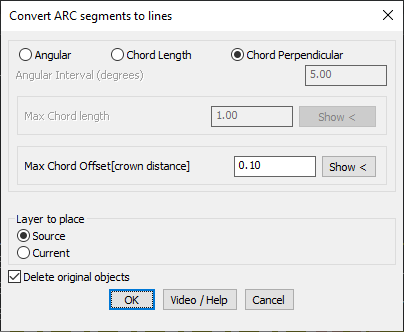
Key Features Include:
- Three Arc Approximation Methods:
- Angular Interval – Converts arcs into linear segments at specified angular intervals (degrees). Ideal for geometric replacements at fixed angles.
- Chord Length – Approximates the arc using line segments with a maximum chord length, ensuring controlled segment density.
- Chord Perpendicular (Crown Distance) – Limits the maximum deviation from the arc to the chord midpoint, providing the most precise arc interpolation for survey and engineering applications.
- Layer Placement Control:
- Source Layer – Places the converted polyline in the original object’s layer.
- Current Layer – Places the converted polyline in the active layer.
- Option to Delete Original Objects:
- Choose to remove the source arc/polyline after conversion for a cleaner workspace.
Use Cases:
- Topographical mapping & surveying where polyline arcs must be represented as straight-line segments.
- CNC machining & digital fabrication where linearized polylines are required.
- Road alignments & infrastructure planning needing accurate arc approximations.
Benefits:
This tool is essential for engineers, surveyors, and CAD professionals who require precision in converting arcs into straight-line segments while retaining geometric accuracy.