
A Ribbonized View of the New BricsCAD V20
Sweden, Stockholm
Ribbon content in BricsCAD V20 have changed quite a bit. There are completely new ribbon elements and other have been re-organized and re-positioned in an effort to make the tools more discoverable.
This post shows you a pictorial view of all the ribbons in the new BricsCAD V20 interface.
Drafting Tools

Drafting Tools – HOME Tab

Drafting Tools – INSERT Tab

Drafting Tools – MANAGE Tab
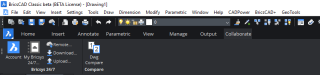
Drafting Tools – COLLABORATE Tab

Drafting Tools – ANNOTATE Tab

Drafting Tools – OUTPUT Tab

Drafting Tools – PARAMETRIC Tab

Drafting Tools – VIEW Tab
Modeling Tools

Modeling Tools – ANNOTATE Tab

Modeling Tools – BIM Tab
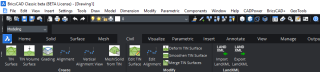
Modeling Tools – CIVIL Tab

Modeling Tools – MECHANICAL Tab

Modeling Tools – MESH Tab

Modeling Tools – PARAMETRIC Tab

Modeling Tools – SOLID Tab

Modeling Tools – VISUALIZE Tab
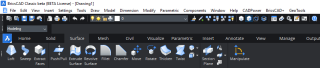
Modeling Tools – SURFACE Tab
BIM Tools

BIM Tools – ANNOTATE Tab

BIM Tools – DATA Tab

BIM Tools – MODELING Tab

BIM Tools – STRUCTURAL/MEP Tab

BIM Tools – TOOLS Tab
For BricsCAD in India, Contact DesignSense
CADPower V20 for BricsCAD: EXE (-or-) ZIP (Linux/Mac compatible)
CADPower V20 for AutoCAD: EXE (-or-) ZIP
GeoTools V20 for BricsCAD: EXE (-or-) ZIP (Linux/Mac compatible)
GeoTools V20 for AutoCAD: EXE (-or-) ZIP
BricsCAD V19: Trial download
BricsCAD V19 Shape: Free download
BricsCAD Communicator V19: Trial download
Key Contacts: rakesh.rao(at)thedesignsense.com / +91-9243438300 / +91-8073279755
Follow us on Twitter: https://www.twitter.com/rakesh_rao
Key Contacts: rakesh.rao(at)thedesignsense.com / +91-9243438300 / +91-8073279755
Follow us on Twitter: https://www.twitter.com/rakesh_rao
A Ribbonized View of the New BricsCAD V20